
(1) Definition: Pixel calibration refers to establishing the correspondence between the pixel size of the computer display and the actual size.
(2) The necessity of pixel calibration:
Calibration must be performed before the first measurement, otherwise the measurement results may be incorrect.The different magnifications of the lens correspond to different pixel calibration data, and you must perform the corresponding pixel calibration before measuring at a certain magnif
(3)Pixel calibration type:
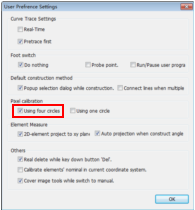
① Four circles calibration:The four circles calibration means that the same standard circle is moved to the four quadrants of the cross lines in the image area for calibration.
② One circle calibration:The one circle calibration means that a standard circle is moved to the center of the image area for calibration.
ication. Pixel calibration must be performed after the CCD camera or lens are replaced or loosened.
(4) Operation method:
① Manual calibration:When performing calibration, manually move the standard circle and manually capture the contour of the circle image. (Usually used for the manual image measuring instrument).
② Automatic calibration:Automatically move the standard circle and automatically capture the contour of the circle image. (Usually use
(5) Pixel calibration standard:
Please use the calibration standard provided by the supplier of the image measuring instrument to calibrate, such as a glass calibration sheet.
Note: Usually the manual machine uses the manual-four-circle calibration, the CNC machine uses the automatic-four-circle calibration, the one-circle calibration is used for the machine that its worktable is not movable or no linear scales.
d for the CNC image measuring instrument).
(1) The following describes the four circle pixel calibration method at the 0.7X magnification. Please distinguish the difference between the manual machine and the CNC machine.
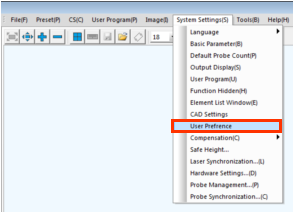
Step 1: Select the pixel calibration type: Select the "System settingsàUser Preferences" in the main menu, and select the calibration type in the popup dialog box. In general, please select the "Using four circles " option for themeasuring instrument that its XY-axis with linear scales.
Name: Mikrosize
Mobile:0086-13918745376
Tel:0086-769-85331789
Email:mikrosize@188.com
Add:NO7 East Xingfa Road Wusha, Changan Town, Dongguan, China.
 Microsize
 Microsize