
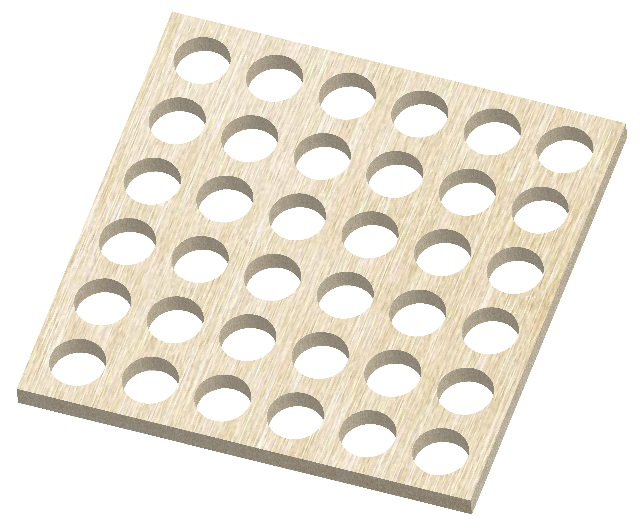
When there are many equidistant elements on the workpiece, you can first extract one of these element of simage measurment machine, and then generate the remaining elements by using the element translation or element matrix function. It can save a lot of time to extract the elements. Take measuring the holes of the following workpiece as an example.
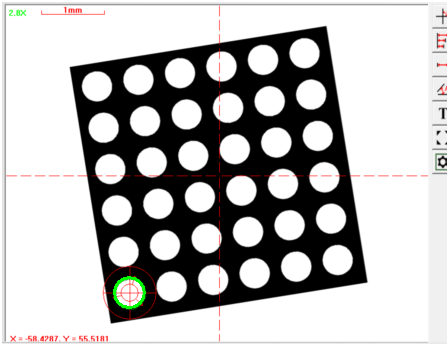
Step 1: Extract the first hole of image measurment machine in the lower left corner of the workpiece image.
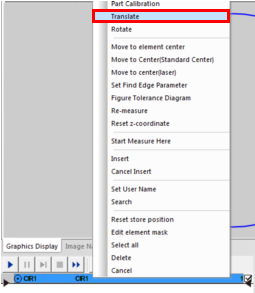
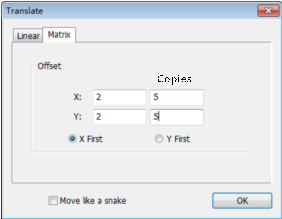
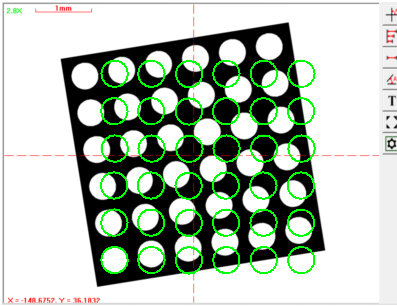
Step 2: Click the right mouse button of image measurment machineon the circle element in the element list area, select the "Translate" menu option, select the matrix tab in the “Translate” dialog box, enter the offset value of the matrix and the number of copies , click the OK button to complete the operation. (Note: The number of copies does not include the original element).
Because the location where the workpiece is placed is uncertain, the matrix circles may not coincide with the circles on the workpiece image, so you need to align the matrix graphics and the actual workpiece image.
Name: Mikrosize
Mobile:0086-13918745376
Tel:0086-769-85331789
Email:mikrosize@188.com
Add:NO7 East Xingfa Road Wusha, Changan Town, Dongguan, China.
 Microsize
 Microsize