
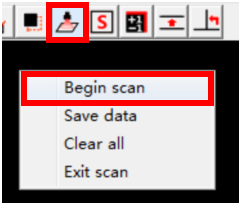
Step 1: Click the“Scan” button on graphics area toolbar of video measuring tester , and click the right mouse button in the graphics area and select the "Begin Scan" menu option, and the "Scan workpiece Settings" dialog box is displayed.
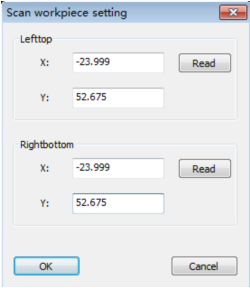
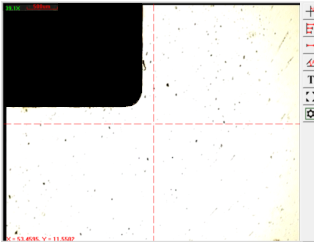
Step 2: Move the top left corner of the workpiece to the center of the image area and click the "Read" button at the top of the dialog box. (Note: Do not close the dialog box now.)
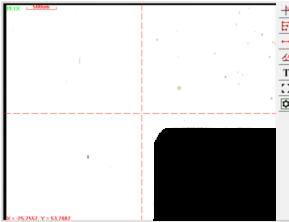
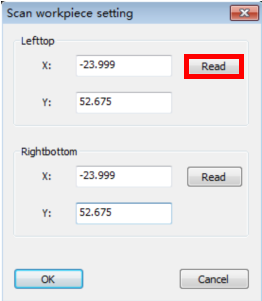
Step 3: Move the bottom right corner of the workpiece to the center of the image area and click the "Read" button at the bottom of the dialog box.
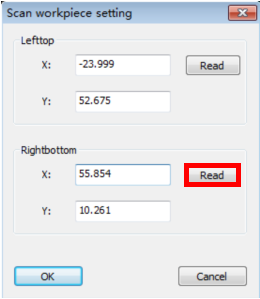
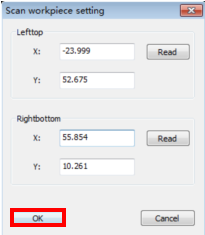
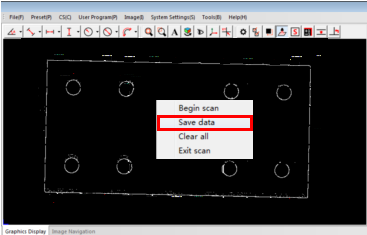
Step 4: Click the OK button, the software will control the machine to perform the jigsaw scanning for the workpiece, after the scanning is complete, you will get the point clouds contour of the workpiece in the graphics area. Click the right mouse button in the graphics area and select the“Save data”menu option to save the contour as a dxf format document.
Name: Mikrosize
Mobile:0086-13918745376
Tel:0086-769-85331789
Email:mikrosize@188.com
Add:NO7 East Xingfa Road Wusha, Changan Town, Dongguan, China.
 Microsize
 Microsize