
After the software is installed successfully, insert the USB key into the computer USB interface, open the power switch of the image measuring instrument, double-click the software icon on the desktop,
the software will start.
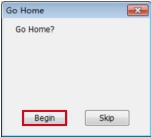
When the software pop up the "Go Home" dialog box as shown below. Be sure to confirm there are no obstacles on the worktable of the machine or around it, and then click the "Begin" button to find the
Home Position of the
image measuring instrument. The software will automatically enter the main interface after it has found the Home Position. (Note: Here the Home Position refers to the mechanical coordinate origin
of the image measuring instrument. You should find the Home Position when the software pops up “Go Home” dialog box.)
Name: Mikrosize
Mobile:0086-13918745376
Tel:0086-769-85331789
Email:mikrosize@188.com
Add:NO7 East Xingfa Road Wusha, Changan Town, Dongguan, China.
 Microsize
 Microsize