
These two functions are used for the CNC image measuring instrument, the manual image measuring instrument can skip this section.
(1) The fixture array measurement
In batch mearement, a lot of the same workpieces placed on a fixture are basically equidistant, you can measure one of the workpieces first and then use the fixture array measurement function to measure all the workpieces on the fixture. You can save time greatly and simplify the user program by using this fuction. As shown below:

Step 1: Create the workpiece coordinate system based on the first workpiece on the fixture (Accroding to the actual need you may not need to create the workpiece coordinate system), then extract the measured elements, and save the user program.

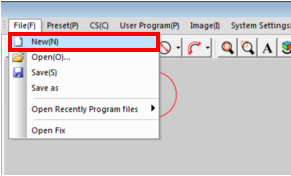
Step 2: Select the "FileàNew" in the main menu and then create a new user program.
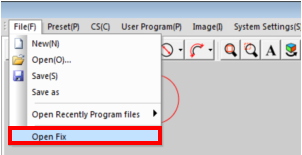
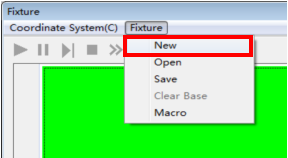
Step 3: Select the "FileàOpen Fix" in the main menu, then select the "FixtureàNew" menu option in the pop up fixture window.
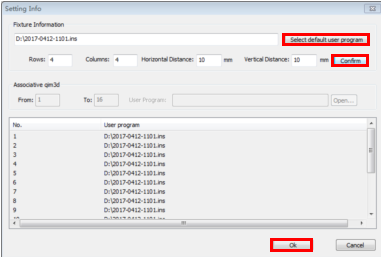
Step 4: Click the "Select default user program" button in the fixture array setting dialog box, select the user program has been saved in Step 1, enter the number of the rows and columns, and enter the horizontal and vertical distance between the workpieces, and then click the“confirm”button to complete to set the fixture array, click the OK button to generate the fixture array program.


Name: Mikrosize
Mobile:0086-13918745376
Tel:0086-769-85331789
Email:mikrosize@188.com
Add:NO7 East Xingfa Road Wusha, Changan Town, Dongguan, China.
 Microsize
 Microsize