
The system has the adjustment of feeding distance, feeding speed, cutting speed.
The automatic operation includes Y direction, X direction, Z direction, which adopts Mitsubishi servo motor control and touch screen control, also can be controlled by electronic hand wheel.
The stop button is the emergency stop button of the system, press it to stop the system and after turn right it works normally.
The power switch is the power supply switch of the entire system, turn off the machine when the machine is not in use.
Operation menu is as follows:
There are 7 buttons in the main interface: Y Operation, Y Parameter Setting, Z Operation, Z Parameter Setting, X Operation, State Display, Operating Instruction.
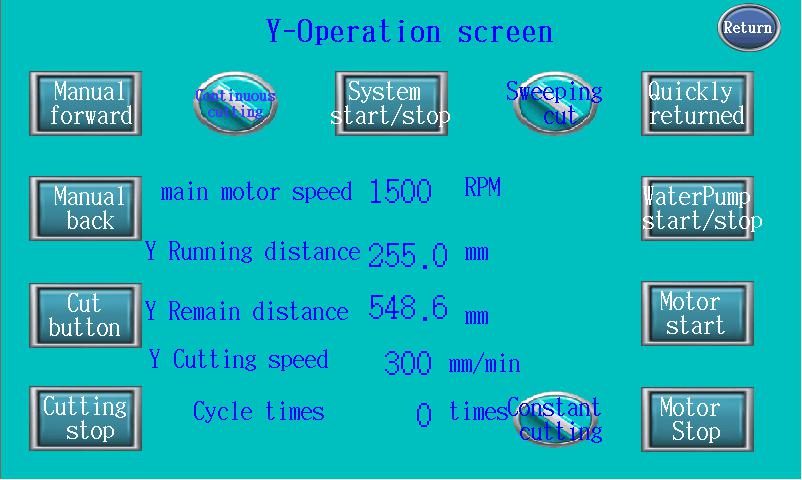
Y Operation
It means valid that the color of the button becomes green.
The System Start/Stop button is the switch button of the whole system; it must be pressed first before operation so that other buttons could be valid.
Press Forward and Press Backward button, the servo motor works when press on and stops when release, the speed is what you set.
Cutting mode divides to: Absolute cutting (Sweep cutting), Swing cutting, Reciprocating cutting, Variable speed cutting.
Absolute cutting (Sweep cutting) means that the sample being cutting moves continuously at a constant speed. The speed is what you set; the cutting speed for steel should be under 12mm/min and the speed for aluminum or other low hardness materials could be 20mm/min. The system will change the speed according to the material’s hardness when cutting; it will change feeding to protect the cutting disc.
Swing cutting means that the sample being cutting moves in a swing way. The swing momentum can be adjusted (in the debug interface) and the incremental speed system presets as cut 15 seconds and stop 2 seconds.
Reciprocating cutting is one forward and three backward cutting for cutting big or hard samples.
Variable speed cutting can change the speed according to the material’s hardness. The speed increase a little per minute if the sample is soft and decrease a little if it feels hard to cut, it is suitable for the materials with different hardness.
The Spindle Start is the start button of the cutting disc and the Spindle Stop is the stop button, the Cutting Button becomes valid only after the spindle starts.
Cut Button is the start button of cutting, the cutting distance and cutting speed can be set in the parameter setting interface. Before cutting you can press Press Forward button to move forward in front of the cutting disc, set the cutting distance according to the size of the sample, the cutting distance should be 10mm greater than the sample and the cutting speed for steel should be under 10mm/min, the speed for aluminum or other low hardness materials could be 20mm/min. The Stop Button is the stop button of cutting.
Quickly Return is the fast backward button, the speed is 300mm/min, the returning distance is the cutting length in the parameter setting.
The Water Pump Start/Stop button of cooling water tank and ventilating fan, press once to change the state, it starts when the button color is green.
The Running Distance shows the coordinate of the sample, the travel is 420mm, when moves to backward limit switch position, the coordinate becomes zero.
The Remaining Distance shows how much travel left.
The Cutting Speed shows the moving speed of the sample.
Press Manual Left to move the test table to the left, and press Manual Right to move the test table to the right.
Y Parameter Setting
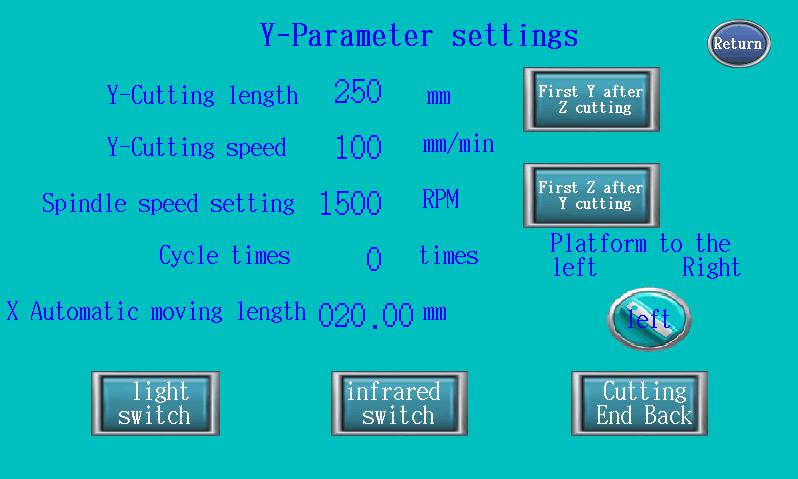
The cutting length is the running distance of each cutting and quick return, the max. travel is 420mm (the distance between backward limit switch and feed limit switch), usually set 20mm greater than the sample.
The cutting speed is stepless adjusting, usually set as 3mm/min, 5mm/min, 8mm/min, 10mm/min, for steel 10mm/min, for aluminum 20mm/min. If there is no sample, the speed can reach 100mm/min.
The spindle speed is 500~2800r/min, controlled by frequency converter. The cutting speed for hard materials can be 1500~1800r/min, the torque will be too small to cut if the speed is too fast.
Infrared switch lights on after a press, which is used to locate the cutting position.
Light switch lights off all the lamps in the cutting room after a press, the light is on when the system starts.
Cutting End Back means that it will return to the initial position where you press it after finish cutting, it is valid after pressed.
Z Operation is similar to Y Operation.
Name: Mikrosize
Mobile:0086-13918745376
Tel:0086-769-85331789
Email:mikrosize@188.com
Add:NO7 East Xingfa Road Wusha, Changan Town, Dongguan, China.
 Microsize
 Microsize